 PeskTop Pesktop- Download Fully Activated Programs for Windows, Mac

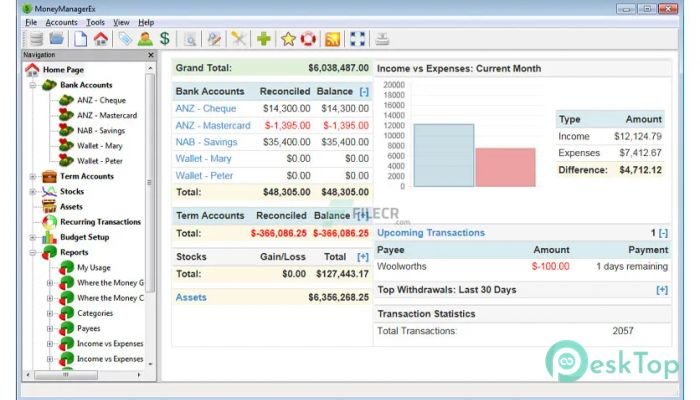
Money Manager Ex 1.9.3 is a personal finance application designed to help users organize income, expenses, accounts, budgets, assets, and everyday financial activity in one place. It is suitable for individuals and households who want a clearer picture of where their money comes from and where it goes. Users can create checking, savings, credit card, investment, and asset accounts, then record transactions and review their financial information through reports and charts. The software also supports scheduled transactions, budgeting, multiple currencies, attachments, and data import and export options. This makes it useful for tracking monthly spending, managing recurring bills, reviewing account balances, and keeping a record of personal financial activity. If you are looking for practical Windows software for maintaining a local financial record, Money Manager Ex provides a structured approach without requiring advanced accounting knowledge.
The workflow is straightforward. After creating or opening a database, users add their accounts and enter deposits, withdrawals, transfers, and other transactions. Categories and payees can then be used to organize the information, making it easier to review spending patterns later. Scheduled transactions help with regular bills or recurring income, while budgets can be compared with actual spending. Reports provide another way to examine balances, cash flow, transactions, investments, and other financial data. Money Manager Ex is used by people who prefer to keep personal finances organized without relying entirely on spreadsheets. It can also help solve common problems such as losing track of small expenses, forgetting recurring payments, or having financial information spread across several files. CSV and QIF import and export support can also make it easier to move existing data or prepare information for use elsewhere.
Money Manager Ex 1.9.3 continues development work following the 1.9.2 release and includes improvements around account handling, reports, currencies, database-related code, translations, and the desktop interface. Development builds for this branch have added account icon customization and bank logo support, options for account and account-type summaries, additional filtering in summary reports, transaction dialog adjustments, and updates to the wxWidgets framework used by the application. The release work also includes fixes and refinements intended to improve reliability across supported desktop environments. Windows users can benefit from the same cross-platform database approach used by the project, while portable builds remain useful when installation is not preferred. As with any newer build, users should back up an existing database before upgrading because changes between versions may affect compatibility with older releases.
Key Features of Money Manager Ex 1.9.3
- Account Management
Create and manage checking, savings, credit card, investment, and asset accounts from one database. - Expense and Income Tracking
Record transactions with dates, categories, payees, notes, tags, and other useful details. - Budgeting and Cash Flow
Set monthly or yearly budgets and compare planned spending with actual financial activity. - Reports and Charts
Review transactions, balances, spending patterns, and other financial information through built-in and custom reports. - Scheduled Transactions
Manage recurring bills, deposits, and other regular transactions with scheduled entries. - Import and Export
Work with CSV and QIF data and export supported financial information for backup or further use.
What’s new in Money Manager Ex 1.9.3?
- Added account icon customization and support for custom selections and bank logos.
- Updated the application framework with newer wxWidgets 3.3.x work for the desktop build.
- Improved database API code and related internal handling.
- Added apostrophe support as a grouping character in Currency Manager.
- Improved account summary reporting with selection between accounts and account types.
- Added filtering options for accounts and time periods in summary reports.
- Refined the transaction dialog, including adjustments to OK and Cancel button placement.
- Improved translation handling with updated string translation macros and additional translatable text.
- Added an option related to hiding the reconciled balance on the home screen.
- Updated the Payee-PayeeTrend general report with a selectable input.
- Improved compiler and build support, including Clang-related fixes and Windows build warnings.
- Other bug fixes, code refinements, and performance improvements.
ScreenShots
System Requirements
- Operating System: Windows 10 or Windows 11
- Processor: 1 GHz or faster processor
- RAM: 2 GB or more recommended
- Storage: 200 MB of available space
- Extra: Internet connection is optional for downloading updates or online financial data features.
Why I Recommend
I recommend Money Manager Ex for users who want a clear and practical way to organize personal financial information. The application covers the everyday tasks most people need, including recording expenses, tracking income, managing multiple accounts, planning budgets, and reviewing reports.
A useful advantage is its local database approach and support for common data formats. Users can keep their records organized, import existing information, and export data when required. The project also provides flexible reporting and customization options, making it suitable for users who want more than a basic expense list.
Money Manager Ex 1.9.3 is best suited to individuals, families, and users who prefer a dedicated desktop application for managing personal finances. It can be especially useful for anyone replacing a spreadsheet-based workflow or building a more consistent record of daily financial activity.
Technical Details
- Software Name: Money Manager Ex
- Version: 1.9.3
- Developer: MoneyManager Ex
- License Type: Full
- Supported OS: Windows 10 / Windows 11