 PeskTop Pesktop- Download Fully Activated Programs for Windows, Mac

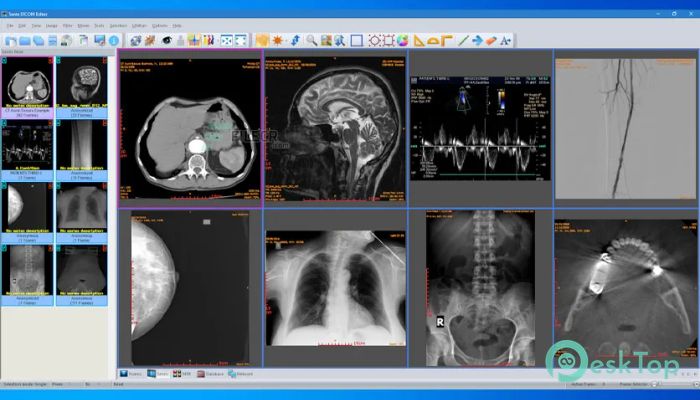
Sante DICOM Editor 10.4.1 is a Windows application for viewing, editing, converting, anonymizing, and managing DICOM medical image files. It is designed for users who work with digital medical images from different imaging systems, including CT, MR, NM, US, XA, MG, and CR equipment. The program can also handle common image formats such as JPEG, JPEG2000, TIFF, PNG, and BMP, making it useful when images need to be converted into DICOM files for further processing. Radiology professionals, medical imaging departments, researchers, technicians, and organizations working with DICOM data can use it for tasks such as reviewing studies, modifying DICOM headers, anonymizing patient information, comparing series, and preparing files for transfer. It also includes PACS client functionality and can operate as a lightweight PACS server. If you need a Sante DICOM Editor 10.4.1 download for Windows, this release provides a dedicated environment for working with DICOM files and related medical image data.
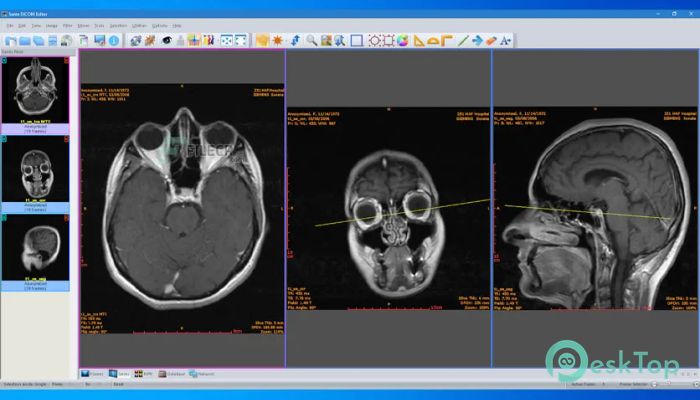
The workflow in Sante DICOM Editor is centered around DICOM studies, series, and individual images. Users can open existing files, inspect their information, edit DICOM headers, modify multiple fields, and anonymize files or series when required for appropriate data-handling workflows. The application also supports batch operations, including batch anonymizing and conversion, which can reduce repetitive manual work when handling groups of files. Its PACS client supports DICOM network services such as C-FIND, C-MOVE, C-STORE, C-GET, and C-ECHO, allowing compatible systems to exchange studies over a DICOM network. Users can also compare series, attach PDF reports to studies, take calibrated ultrasound measurements, and convert ordinary images or video into DICOM files. These tools make the software useful for organizations that need to inspect and prepare imaging data without relying on several separate utilities.
Version 10.4.1 is a maintenance release of Sante DICOM Editor and the official changelog describes the update as containing minor improvements. The previous 10.4 release introduced command-line switches that allow certain operations to run without loading the graphical interface, as well as support for uploading ZIP archives containing DICOM files to C-STORE SCPs. Earlier releases also introduced a faster Direct2D graphics engine, TLS support for DICOM network connections, OHIF Viewer support, MPR reconstruction export, image and frame import, and various memory and speed optimizations. These capabilities remain part of the broader 10.x application. The official current requirements for the Windows edition specify Windows 11 or Windows 10 and supported Windows Server editions, together with at least an Intel Core i3 or AMD Ryzen 3 processor, 8 GB of memory, and a 2 GB DirectX 11-compatible graphics card. Version 10.4.1 was released for Windows as a 64-bit package.
Key Features of Sante DICOM Editor 10.4.1
- DICOM Viewer and Editor
Open DICOM studies and work with images, series, frames, and associated DICOM information from supported imaging modalities. - DICOM Header Editing
Inspect and modify DICOM file information and use batch modification tools when working with multiple files. - Anonymization Tools
Anonymize DICOM files and series, including batch anonymization with configurable templates for selected fields. - DICOM Conversion
Convert JPEG, TIFF, BMP, PNG, and other supported image formats into DICOM files, with options for single-frame and multi-frame conversion. - PACS Client and Network Support
Connect to compatible DICOM systems using services including C-FIND, C-MOVE, C-STORE, C-GET, and C-ECHO, with TLS support for network connections. - Orthogonal MPR and Study Tools
Use multi-planar reconstruction and additional study tools for examining and organizing medical image data.
What’s new in Sante DICOM Editor 10.4.1?
- Version 10.4.1 is a maintenance update released for the Sante DICOM Editor application.
- The official changelog lists minor improvements in version 10.4.1.
- The release continues the Windows 64-bit edition of Sante DICOM Editor.
- Command-line switches introduced in version 10.4 remain available for compatible workflows.
- ZIP archive uploading containing DICOM files to C-STORE SCPs was introduced in version 10.4.
- The application retains its Direct2D-based graphics engine introduced in the 10.0 series.
- TLS support for DICOM network connections remains available.
- OHIF Viewer support remains part of the application’s DICOM review workflow.
- Orthogonal Multi-planar Reconstruction remains available for supported imaging data.
- Batch anonymization and batch conversion tools remain available for processing groups of files.
- DICOM image and frame import and export functions remain part of the 10.x feature set.
- Other minor fixes and improvements are included as documented by the developer.
ScreenShots
System Requirements
- Operating System: Windows 11, Windows 10, Windows Server 2025, Windows Server 2022, Windows Server 2019, Windows Server 2016
- Processor: Intel Core i3 / AMD Ryzen 3 or greater
- RAM: 8 GB or more; 16 GB recommended for large ultrasound files
- Storage: Sufficient free disk space for the application and DICOM image data
- Extra: Graphics card with 2 GB memory and DirectX 11 compatibility; monitor supporting 1366×768 or higher and 16M colors
Why I Recommend
Sante DICOM Editor is useful when DICOM work involves more than simply opening an image. It combines viewing, editing, anonymization, conversion, database functions, network communication, and study-management tools in one Windows application. This can be practical for users who regularly handle DICOM studies and need to inspect or prepare files for different workflows.
The batch tools are particularly useful for repetitive work. Instead of changing individual files one at a time, users can apply supported anonymization or conversion operations to groups of files. The application’s DICOM editing and PACS tools also provide options for communicating with compatible imaging systems and working with studies stored on local or network resources.
Sante DICOM Editor is mainly suited to radiology and medical-imaging professionals, technicians, researchers, and organizations that work with DICOM data. It can also be useful for developers or technical users who need DICOM conversion, anonymization, command-line integration, or network testing capabilities. Users should still follow their organization’s privacy, security, and clinical-data handling procedures when working with patient information.
Technical Details
- Software Name: Sante DICOM Editor
- Version: 10.4.1
- Developer: Santesoft
- License Type: Commercial | 90-Day Demo
- Supported OS: Windows 10, Windows 11, Windows Server 2016, Windows Server 2019, Windows Server 2022, Windows Server 2025