 PeskTop Pesktop- Download Fully Activated Programs for Windows, Mac

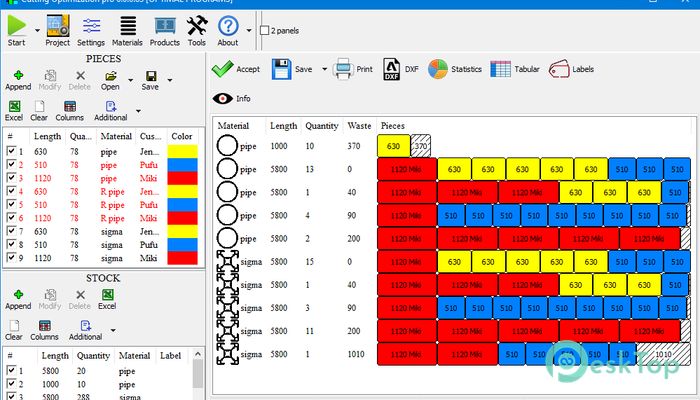
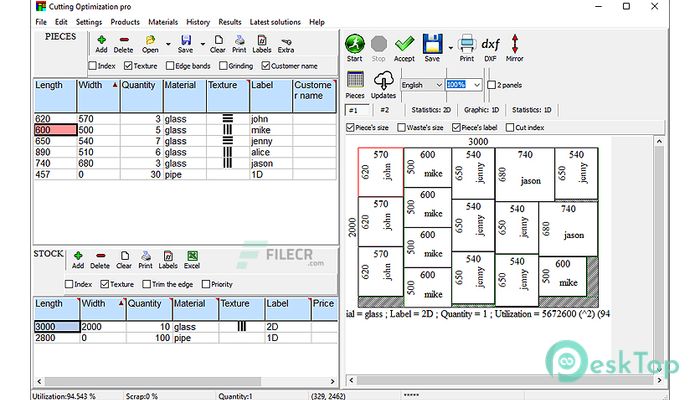
Cutting Optimization Pro 5.18.24 is a practical cutting layout application designed to help users reduce material waste when working with wood, glass, metal, pipes, panels, and other materials. The software calculates efficient cutting patterns for both one-dimensional and two-dimensional projects, making it useful for furniture manufacturers, cabinet makers, metal fabricators, sign shops, and construction professionals. Instead of manually planning every cut, users can enter material sizes, stock quantities, and required dimensions, allowing the program to generate optimized layouts in seconds. This approach saves time while improving material utilization. Businesses that handle repeated cutting jobs often rely on software like Cutting Optimization Pro to simplify production planning, reduce unnecessary waste, and prepare accurate cutting lists before work begins. Whether managing a small workshop or a larger production environment, this version provides reliable tools for everyday optimization tasks.
Using Cutting Optimization Pro follows a straightforward workflow. Users begin by entering available stock materials and the dimensions of required parts. After selecting optimization settings, the software analyzes the data and generates cutting layouts designed to maximize material usage. Results can be reviewed visually before printing reports, labels, or exporting project information for production. This process reduces manual calculations and minimizes the risk of measurement errors that may occur during planning. Woodworking companies, aluminum fabricators, glass processors, and manufacturing facilities frequently use this type of software to organize production schedules and estimate material requirements more accurately. It is equally suitable for custom jobs and large production batches where reducing waste directly affects operating costs. By automating layout calculations, the software allows teams to spend more time on production instead of planning.
Version 5.18.24 mainly focuses on improving reliability and everyday usability. The update introduces the ability to print stickers for waste generated during the current optimization, making leftover materials easier to identify during production. Several bugs affecting product selection checkboxes and graphical edge band display have also been corrected. Error messages have been improved to better explain situations where optimization cannot be completed because of insufficient materials or technical settings. Translation improvements provide a smoother experience for international users. The software continues to perform well on modern Windows systems while maintaining compatibility with existing project files and production workflows. These refinements make version 5.18.24 a stable maintenance update that improves day-to-day efficiency without changing the familiar interface.
Key Features of Cutting Optimization Pro 5.18.24
- 1D and 2D Optimization
Optimizes both linear and rectangular cutting layouts. - Material Waste Reduction
Creates layouts that improve material usage. - Project Management
Organizes materials, parts, and optimization settings in one project. - Reports and Labels
Prints cutting reports, labels, and production information. - Import and Export
Supports Excel, CSV, and other production-friendly formats. - Graphical Layout Preview
Displays cutting plans before production begins.
What’s new in Cutting Optimization Pro 5.18.24?
- Added support for printing stickers for waste from the current optimization.
- Maintains compatibility with current Windows versions.
- Improved optimization error reporting for incomplete jobs.
- Fixed product window checkbox issues.
- Optimized graphical edge band display.
- Improved application stability.
- Refined optimization engine behavior for reporting.
- Better handling of production output information.
- Improved processing feedback during optimization.
- Minor interface refinements.
- Translation updates for multiple languages.
- Other bug fixes and performance improvements.
ScreenShots
System Requirements
- Operating System: Windows 7, Windows 8, Windows 10, Windows 11
- Processor: Intel or AMD 1 GHz or faster
- RAM: 2 GB minimum (4 GB recommended)
- Storage: 100 MB available space
- Extra: Mouse, keyboard, and printer recommended for reports
Why I Recommend
Cutting Optimization Pro is useful for anyone who regularly plans cutting jobs and wants to reduce material waste without spending time performing manual calculations.
The software provides practical optimization tools, clear graphical layouts, and reporting features that simplify daily production planning for workshops and manufacturing businesses.
It is especially suitable for woodworkers, furniture manufacturers, glass processors, aluminum fabricators, and professionals handling repetitive cutting projects where accurate planning improves efficiency.
Technical Details
- Software Name: Cutting Optimization Pro
- Version: 5.18.24
- Developer: Optimal Programs
- License Type: Full | Preactivated
- Supported OS: Windows