 PeskTop Pesktop- Download Fully Activated Programs for Windows, Mac

Donemax Data Eraser Business 4.6 is a professional data wiping solution designed to permanently erase sensitive information from Windows computers and storage devices. Unlike simply deleting files or formatting a drive, this software overwrites existing data using recognized data sanitization methods, making recovery significantly more difficult. It is intended for businesses, IT departments, managed service providers, and organizations that need to protect confidential information before selling, recycling, or reusing computers. The software can securely erase files, folders, entire hard drives, SSDs, USB flash drives, memory cards, and other supported storage devices. It also helps remove traces of online activity and temporary files that may contain sensitive information. For organizations handling customer records, financial documents, employee files, or business projects, Donemax Data Eraser Business offers a practical way to reduce the risk of unwanted data exposure while preparing systems for new users or disposal.
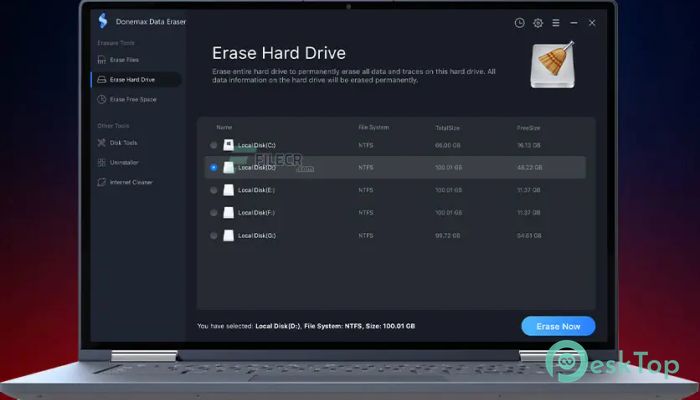
The software follows a straightforward workflow that makes secure data removal easy to manage. Users select the files, partitions, or drives they want to erase, choose an available erasure method, and begin the wiping process. The program handles the remaining work automatically while displaying progress throughout the operation. Businesses often use it during hardware replacement projects, employee device reassignment, or computer retirement. IT administrators can erase multiple systems before deployment or disposal, helping maintain data security policies across an organization. The software also cleans internet history, application traces, temporary files, and other unnecessary data that may accumulate over time. This combination of secure erasure and privacy cleanup helps free storage space while protecting confidential information from recovery tools. The interface is organized clearly, allowing both experienced administrators and regular office users to complete secure erasure tasks without unnecessary complexity.
Version 4.6 focuses on improving compatibility with newer Windows updates and modern storage hardware while refining the overall user experience. The release includes stability improvements during large drive erasure jobs and better handling of SSDs, external storage devices, and high-capacity disks. Performance has been optimized to improve scanning and processing efficiency without changing the familiar workflow that existing users rely on. Interface refinements make navigation smoother, while minor adjustments improve task reliability during long erasure sessions. Compatibility with current Windows 10 and Windows 11 environments has also been refined, helping the software operate consistently on updated systems. Overall, Donemax Data Eraser Business 4.6 continues to provide dependable secure data removal for organizations and professionals that need permanent data destruction while maintaining reliable performance across a wide range of supported storage devices.
Key Features of Donemax Data Eraser Business 4.6
- Permanent Data Erasure
Securely overwrites files and drives to help prevent data recovery. - Drive Wiping
Erase entire HDDs, SSDs, USB drives, memory cards, and external storage devices. - Privacy Cleanup
Removes browser history, temporary files, cookies, and application traces. - Multiple Erasure Standards
Supports recognized data wiping methods for different security requirements. - Simple Management
Easy-to-use interface suitable for business users and IT professionals. - Windows Compatibility
Works with modern Windows systems and a wide range of supported storage hardware.
What’s new in Donemax Data Eraser Business 4.6?
- Improved compatibility with recent Windows updates.
- Enhanced support for newer SSDs and high-capacity storage devices.
- Refined data erasure workflow for smoother operation.
- Optimized scanning and processing performance.
- Better resource management during large erasure tasks.
- Improved overall application stability.
- Updated storage handling engine for better reliability.
- Enhanced processing of external storage devices.
- Improved secure wiping performance across supported drives.
- Minor interface refinements for easier navigation.
- General maintenance updates for improved usability.
- Other bug fixes and performance improvements.
ScreenShots
System Requirements
- Operating System: Windows 7, Windows 8, Windows 10, Windows 11 (64-bit recommended)
- Processor: Intel or AMD 1 GHz or faster
- RAM: 2 GB minimum (4 GB recommended)
- Storage: 200 MB available disk space
- Extra: Administrator privileges required for drive erasure operations
Why I Recommend
Donemax Data Eraser Business 4.6 is a practical choice for anyone who needs to permanently remove sensitive information instead of simply deleting files. Its straightforward interface and secure erasure options make routine data sanitization much easier to manage.
The software combines secure drive wiping with privacy cleanup tools, allowing users to prepare computers for resale, recycling, or internal deployment while reducing the chance of recoverable data remaining on storage devices.
It is especially suitable for IT administrators, businesses, repair shops, managed service providers, and organizations that regularly handle confidential information and need a dependable solution for secure data destruction.
Technical Details
- Software Name: Donemax Data Eraser Business
- Version: 4.6
- Developer: Donemax
- License Type: Full | Preactivated
- Supported OS: Windows