 PeskTop Pesktop- Download Fully Activated Programs for Windows, Mac

Filezo 6.0.17 is a Windows productivity application designed to help users find files, folders, and applications much faster than relying on the standard File Explorer search. Formerly known as RecentX, the software combines fast indexing, intelligent search, tagging, notes, and file previews into a single workspace. Whether you work with thousands of documents every week or simply want quicker access to frequently used files, Filezo can reduce the time spent navigating through folders. It is suitable for office professionals, developers, designers, students, and anyone who manages large collections of files on a Windows PC. Instead of remembering where a document is stored, users can search by name, tag, or keyword and open the required file within seconds. This practical approach helps improve daily productivity without changing the way Windows stores your files.
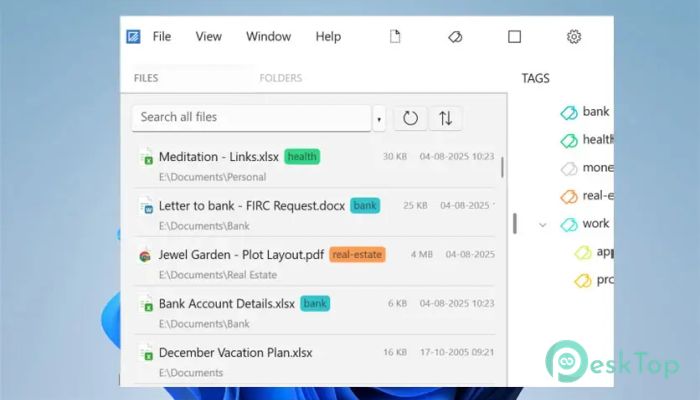
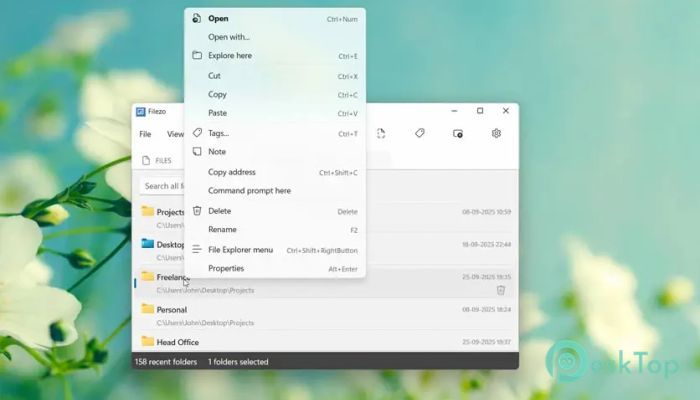
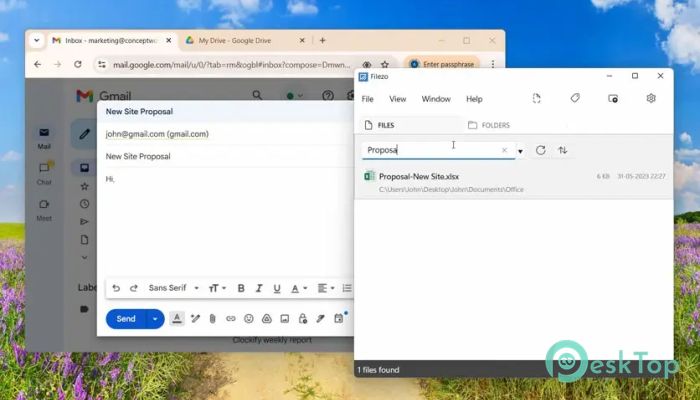
Once installed, Filezo indexes your local storage and builds a searchable database for quick access to files and folders. Users can organize documents with custom tags, attach notes, preview supported file types, and browse folders without opening multiple File Explorer windows. The application also integrates with Windows Open and Save dialogs, making it easier to locate documents directly from other software. This workflow is useful for professionals working with large projects, photographers managing media libraries, programmers handling source files, and business users who regularly access shared folders. Instead of repeatedly navigating through deep folder structures, Filezo provides a centralized search experience that helps reduce repetitive clicks and makes frequently used resources easier to reach throughout the day.
Version 6.0.17 continues improving the Filezo 6 series with a small maintenance release focused on reliability. According to the published changelog, this update fixes an issue where the desktop search bar could reappear after changing the display resolution even when it had been disabled in the settings. The update therefore improves consistency for users working with multiple monitors or frequently changing display configurations. Filezo remains compatible with Windows 10 and Windows 11 in both 32-bit and 64-bit editions, while maintaining the responsive search, tagging, preview, and indexing capabilities introduced in earlier 6.x releases. The lightweight installer and optimized indexing engine continue to provide fast search performance without significantly affecting normal system use.
Key Features of Filezo 6.0.17
- Instant File Search
Quickly locate files, folders, and applications using indexed search. - Custom Tags
Assign tags to organize files beyond traditional folders. - File Preview
Preview many supported file types before opening them. - Notes Support
Attach notes to files and folders for easier reference. - Windows Integration
Works directly with Windows Open and Save dialog boxes. - Smart Organization
Browse, search, and manage files from one interface.
What’s new in Filezo 6.0.17?
- Fixed an issue where the deskbar could reappear after changing display resolution even when disabled.
- Maintains compatibility with Windows 10 and Windows 11.
- Improved reliability for users changing monitor or display settings.
- Continued responsive indexed search performance.
- General optimization for desktop behavior.
- Improved stability during daily use.
- Search engine refinements carried forward from the 6.x series.
- Existing import and tagging functionality retained.
- Continued efficient file indexing and processing.
- No major interface redesign in this release.
- No major new user-facing features introduced.
- Other bug fixes and performance improvements.
ScreenShots
System Requirements
- Operating System: Windows 10 / Windows 11
- Processor: Intel or AMD processor
- RAM: 4 GB minimum
- Storage: 200 MB free disk space
- Extra: NTFS drives recommended for the best experience
Why I Recommend
Filezo is a practical choice for users who frequently search for documents, applications, and folders. Its tagging system and fast indexing can save time during everyday work.
The combination of instant search, file previews, notes, and Windows integration creates a smoother workflow without replacing the normal Windows file system.
It is particularly useful for professionals, students, developers, designers, and office users who manage large numbers of files and want faster access to important documents.
Technical Details
- Software Name: Filezo
- Version: 6.0.17
- Developer: Conceptworld Corporation
- License Type: Full | Preactivated
- Supported OS: Windows 10 / Windows 11