 PeskTop Pesktop- Download Fully Activated Programs for Windows, Mac

Process Explorer 17.12 is a powerful system monitoring utility for Windows that provides detailed information about running processes, active services, loaded DLL files, and system resource usage. Developed as part of the Microsoft Sysinternals Suite, it is widely used by IT professionals, system administrators, software developers, and advanced Windows users who need more insight than the standard Task Manager can provide. The program helps users identify which applications are consuming CPU, memory, disk, or GPU resources while making it easier to troubleshoot performance issues and investigate unexpected background activity. Whether you are diagnosing software conflicts, checking process relationships, or verifying digital signatures, Process Explorer offers a practical way to understand what is happening inside your Windows system. It is also useful for security investigations, helping users inspect suspicious processes before deciding whether they should remain active.
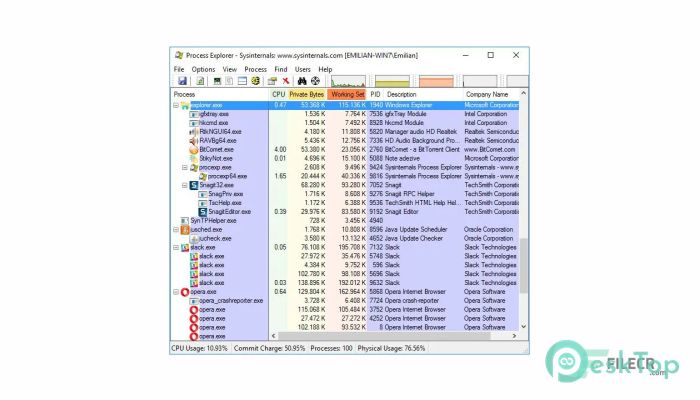
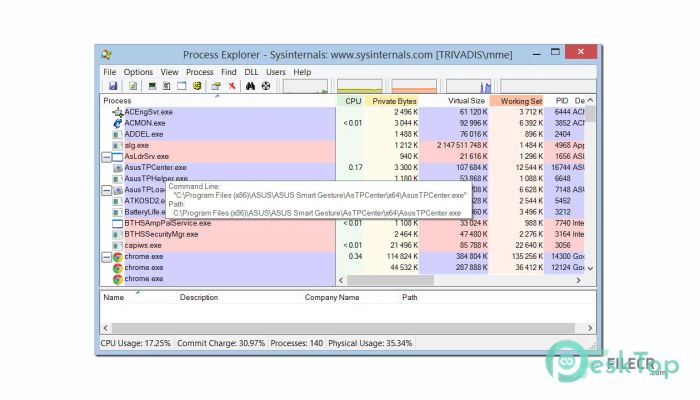
The workflow is straightforward and designed for quick analysis. After launching the application, Process Explorer displays a live tree view of every running process together with detailed information such as CPU usage, memory consumption, process IDs, parent-child relationships, handles, and loaded modules. Double-clicking a process opens additional details that help users examine threads, performance history, environment variables, and security settings. Search tools make it easy to determine which application has an open file or handle, saving valuable troubleshooting time. System administrators frequently rely on these features to resolve locked files, application crashes, and resource bottlenecks. Developers use the tool while debugging software, while technical support teams depend on it to diagnose systems without installing complex monitoring software. The interface updates in real time, making it easy to observe changes as they happen.
Version 17.12 continues to improve reliability, compatibility, and overall usability across modern Windows releases. Microsoft has refined several internal components to better support recent Windows builds while improving process inspection accuracy and stability during long monitoring sessions. Performance has also been optimized when displaying large numbers of running processes or services, allowing smoother navigation on busy systems. Minor interface refinements improve readability without changing the familiar layout that experienced users expect. The application remains lightweight, portable, and easy to launch without a complicated installation process. It continues to work well on both Windows 10 and Windows 11, making it suitable for personal computers, business workstations, and enterprise environments where accurate process monitoring and troubleshooting are essential.
Key Features of Process Explorer 17.12
- Advanced Process Viewer
Displays detailed information about every running process with a live hierarchical view. - Handle and DLL Search
Quickly find which process is using a specific file, registry key, or library. - Resource Monitoring
Monitor CPU, memory, GPU, disk, and other system resources in real time. - Digital Signature Verification
Check process signatures to help identify trusted and suspicious applications. - Detailed Process Properties
View threads, handles, security information, environment variables, and performance details. - Portable Utility
Run the application without a traditional installation, making it convenient for troubleshooting.
What’s new in Process Explorer 17.12?
- Updated compatibility with the latest supported Windows builds.
- Improved support for current Windows security and process management changes.
- Refined process inspection workflow for easier troubleshooting.
- Performance improvements when monitoring systems with many active processes.
- Optimized resource usage during continuous monitoring sessions.
- Improved application stability and reliability.
- Updated internal Sysinternals components for better engine performance.
- Enhanced process information retrieval and reporting accuracy.
- Improved handling of process and handle enumeration.
- Minor interface refinements for better readability.
- Added support for recent Windows platform enhancements where applicable.
- Other bug fixes and performance improvements.
ScreenShots
System Requirements
- Operating System: Windows 10, Windows 11
- Processor: 1 GHz or faster x64 or x86 processor
- RAM: 2 GB minimum (4 GB recommended)
- Storage: Less than 20 MB available space
- Extra: Administrator privileges recommended for full system inspection
Why I Recommend
Process Explorer is one of the most useful diagnostic tools available for Windows because it provides much deeper system information than the default Task Manager. It helps users quickly identify resource-intensive applications and understand how running processes interact with the operating system.
Its practical tools save time when troubleshooting slow computers, locked files, software conflicts, or suspicious background activity. The portable design also makes it easy to carry on a USB drive for maintenance and technical support work.
This utility is ideal for IT administrators, developers, security analysts, technical support professionals, and experienced Windows users who regularly troubleshoot systems. Anyone who needs detailed process information will benefit from using Process Explorer 17.12.
Technical Details
- Software Name: Process Explorer
- Version: 17.12
- Developer: Microsoft Sysinternals
- License Type: Full | Preactivated
- Supported OS: Windows