 PeskTop Pesktop- Download Fully Activated Programs for Windows, Mac

UEFITool A74 is a firmware image viewer and editor designed for working with UEFI BIOS files on Windows computers. It allows users to inspect, extract, and analyze the internal structure of firmware images without relying on complicated command-line utilities. The software is mainly intended for advanced users, firmware researchers, hardware technicians, and developers who need to examine BIOS components or troubleshoot firmware-related issues. It presents firmware volumes, file systems, and modules in a structured tree view, making navigation much easier. Whether you are investigating firmware updates, extracting BIOS modules, or learning how UEFI firmware is organized, UEFITool provides a practical environment for these tasks. Its clean interface helps users understand firmware layouts while maintaining access to detailed technical information that would otherwise be difficult to interpret.
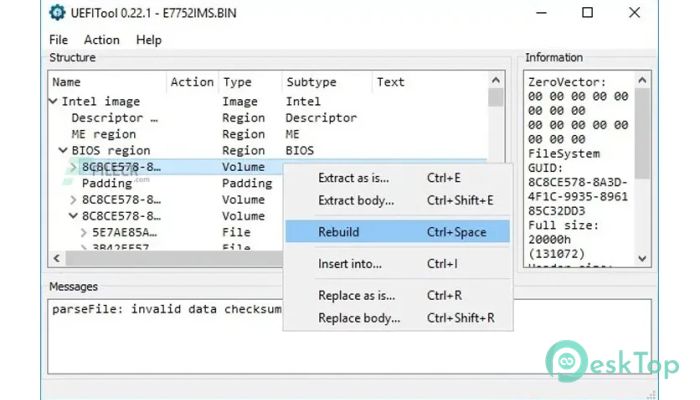
Working with UEFITool is straightforward once a firmware image is loaded into the application. The software automatically parses the file and displays every firmware volume, file, and section in a readable hierarchy. Users can browse different components, search for specific GUIDs, extract individual modules, replace selected sections, or inspect file attributes without manually decoding firmware structures. Hardware repair technicians often use it to investigate BIOS corruption, while firmware modders rely on it when customizing BIOS images before flashing compatible devices. Security researchers also benefit from its ability to inspect firmware contents during vulnerability analysis. Instead of navigating raw binary data, users can focus on meaningful firmware elements, reducing errors and making firmware exploration much more efficient.
Version A74 continues improving compatibility with modern UEFI firmware images while refining the parser used to interpret complex firmware structures. The release includes updates that improve support for newer firmware formats and resolves several parsing issues discovered in previous builds. Performance has also been refined when loading large BIOS images, resulting in faster navigation through complex firmware volumes. Memory handling has been improved to provide smoother operation during extended analysis sessions. Stability enhancements reduce unexpected errors when opening uncommon firmware layouts, helping users work more confidently with different motherboard vendors. These updates allow UEFITool A74 to remain compatible with current Windows versions while providing a reliable environment for firmware analysis, inspection, extraction, and modification workflows.
Key Features of UEFITool A74
- Firmware Structure Viewer
Displays complete UEFI firmware layouts in an organized tree view. - Module Extraction
Extracts firmware files, sections, and volumes for detailed analysis. - Search Function
Finds GUIDs, text strings, and firmware objects quickly. - Module Replacement
Allows supported firmware components to be replaced within images. - Detailed Information
Shows metadata, attributes, and structure details for firmware files. - Wide Firmware Support
Works with many UEFI firmware images from different hardware vendors.
What’s new in UEFITool A74?
- Updated firmware parser for newer UEFI image structures.
- Improved compatibility with recent firmware formats.
- Refined firmware inspection workflow for easier navigation.
- Better performance when opening large firmware images.
- Optimized memory usage during firmware analysis.
- Improved stability when processing uncommon firmware layouts.
- Enhanced parsing engine for more accurate structure detection.
- Improved extraction and replacement handling for supported modules.
- Faster processing of firmware volumes and file systems.
- Minor interface refinements for improved usability.
- Added support for additional firmware parsing scenarios.
- Other bug fixes and performance improvements.
ScreenShots
System Requirements
- Operating System: Windows 7, Windows 8, Windows 10, Windows 11
- Processor: Intel or AMD 1 GHz processor or faster
- RAM: 2 GB minimum (4 GB recommended)
- Storage: 100 MB of available disk space
- Extra: Administrator privileges recommended for firmware-related tasks
Why I Recommend
UEFITool A74 is a practical choice for anyone who regularly works with BIOS or UEFI firmware. It organizes complex firmware structures into a readable format, making analysis and extraction much simpler than working directly with binary files.
The software provides useful tools for examining firmware contents, locating specific modules, and extracting important sections. Its structured workflow helps reduce mistakes and saves time during firmware research and troubleshooting.
This version is especially suitable for firmware developers, motherboard repair technicians, security researchers, hardware enthusiasts, and advanced users who need reliable firmware inspection and editing capabilities on Windows.
Technical Details
- Software Name: UEFITool
- Version: A74
- Developer: CodeRush
- License Type: Full | Preactivated
- Supported OS: Windows 7, Windows 8, Windows 10, Windows 11