 PeskTop Pesktop- Download Fully Activated Programs for Windows, Mac

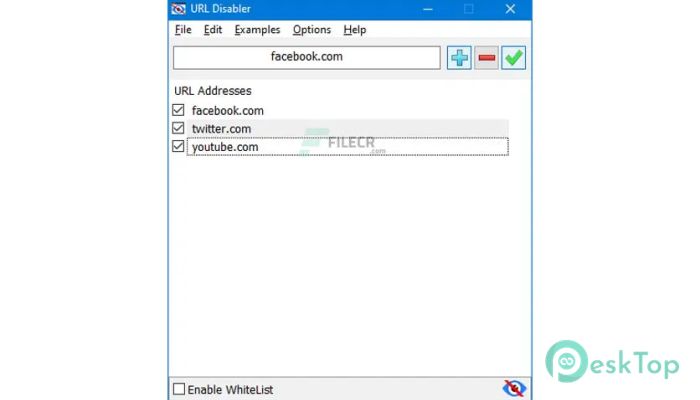
URL Disabler 1.4 is a lightweight Windows utility designed to block access to specific websites by editing the system’s Hosts file through a simple graphical interface. Instead of relying on browser extensions or third-party filtering services, it allows users to prevent selected web addresses from loading across the entire system. This makes it useful for parents, teachers, office administrators, and individuals who want to reduce distractions or limit access to unwanted websites. The application focuses on simplicity, allowing even less experienced users to manage blocked websites without manually modifying system files. Whether you want to block social media during work hours, restrict access to inappropriate content on a shared computer, or prevent specific domains from opening, URL Disabler provides a straightforward solution. Its small size and portable design also make it convenient for quick deployment on personal or workplace computers.
The workflow is simple and requires only a few steps. Users launch the program with administrator rights, enter one or more website addresses, and apply the changes. URL Disabler automatically updates the Windows Hosts file so that selected domains become inaccessible in supported web browsers and many network-aware applications. Removing blocked entries is just as easy, making it practical for temporary restrictions or long-term website management. Home users often rely on it to improve focus while studying or working, while IT administrators may use it to restrict access to selected online resources on shared systems. Because the software works at the operating system level, it does not depend on a particular browser. This approach helps solve common problems such as online distractions, accidental visits to unwanted websites, and basic access control without installing complex security software.
Version 1.4 continues to provide the same lightweight experience while maintaining compatibility with modern Windows releases. The application remains focused on reliable Hosts file management and includes improvements that help it work more smoothly with current Windows security updates. General maintenance has improved overall responsiveness and reduced the likelihood of configuration issues during website blocking or removal. The interface remains clean and easy to understand, allowing users to manage website restrictions with minimal effort. Performance stays fast because the software uses very few system resources, making it suitable for both older and newer computers. URL Disabler 1.4 works well on Windows 7, Windows 8, Windows 10, and Windows 11, providing a practical option for users who need a lightweight website-blocking utility without unnecessary background services or complicated configuration.
Key Features of URL Disabler 1.4
- Website Blocking
Block selected domains through the Windows Hosts file. - Simple Interface
Manage blocked websites using an easy graphical interface. - Quick Removal
Remove blocked entries whenever access is needed again. - Portable Utility
Can be used without a complicated installation process. - Low Resource Usage
Runs efficiently without affecting normal system performance. - Wide Windows Support
Compatible with multiple modern Windows versions.
What’s new in URL Disabler 1.4?
- Updated Hosts file handling for improved reliability.
- Improved compatibility with recent Windows updates.
- Smoother website blocking and unblocking workflow.
- General performance optimizations for faster operation.
- Internal code optimizations for better efficiency.
- Improved stability during configuration changes.
- Refined processing engine for Hosts file management.
- Better handling of importing and saving blocked entries.
- Faster processing when applying multiple website rules.
- Minor user interface refinements for easier navigation.
- Maintenance updates for improved overall usability.
- Other bug fixes and performance improvements.
ScreenShots
System Requirements
- Operating System: Windows 7, Windows 8, Windows 10, Windows 11
- Processor: Intel or AMD processor, 1 GHz or faster
- RAM: 1 GB minimum (2 GB recommended)
- Storage: 20 MB of free disk space
- Extra: Administrator privileges required to modify the Hosts file
Why I Recommend
URL Disabler is a practical utility for anyone who needs a quick way to restrict access to selected websites without installing large security applications. It focuses on one task and performs it efficiently.
The software is easy to learn and works across supported web browsers because it relies on the Windows Hosts file. This makes it useful for reducing distractions, limiting website access, or managing shared computers with minimal effort.
Students, parents, office workers, teachers, and IT administrators can all benefit from URL Disabler. It is especially suitable for users looking for a lightweight website-blocking solution that is simple to configure and maintain.
Technical Details
- Software Name: URL Disabler
- Version: 1.4
- Developer: Sordum Team
- License Type: Full | Preactivated
- Supported OS: Windows