 PeskTop Pesktop- Download Fully Activated Programs for Windows, Mac

WinPE NHV BOOT 2026 v2100 EXTREME is a Windows Preinstallation Environment toolkit designed to help users maintain, repair, and troubleshoot Windows computers without booting into the installed operating system. It combines a lightweight Windows environment with a wide collection of recovery, backup, partition management, and diagnostic utilities in a single bootable package. Whether you are restoring a damaged system, recovering lost files, cloning drives, or checking hardware health, the toolkit provides practical tools for the job. It is commonly used by IT professionals, computer technicians, and advanced home users who regularly maintain multiple computers or need a reliable emergency recovery environment. The bootable media can be used from a USB drive or DVD, making it suitable for repairing systems that no longer start normally.
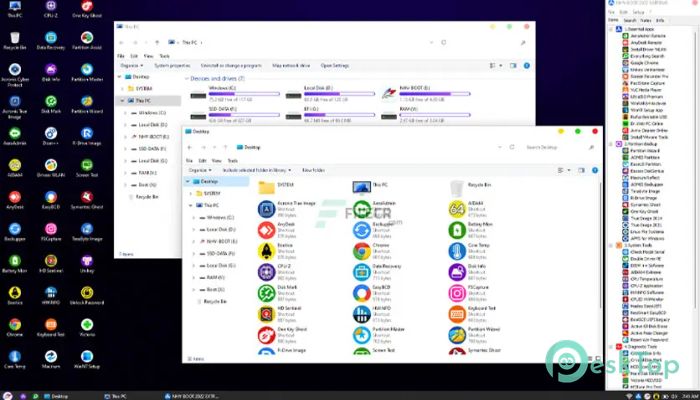
Using WinPE NHV BOOT 2026 follows a simple workflow. Users create a bootable USB drive, start the computer from that device, and access a desktop-like Windows PE environment filled with maintenance utilities. From there, it becomes easier to diagnose startup failures, repair boot records, create or restore disk images, manage partitions, recover deleted files, reset passwords, or test storage devices. Since the operating system runs independently from the installed Windows installation, many repair tasks can be completed safely even when the primary system is inaccessible. Computer repair shops, system administrators, and support technicians often rely on this type of toolkit to reduce repair time while keeping important user data intact whenever possible. It also serves as a convenient emergency solution for users who want reliable recovery tools available before unexpected system problems occur.
Version 2100 of WinPE NHV BOOT 2026 EXTREME includes refreshed utilities, updated driver support, and improved compatibility with modern hardware platforms. The package is better prepared for current Windows installations and newer SSD and NVMe storage devices, allowing maintenance tasks to run more smoothly on recent computers. Various bundled applications have been updated to newer releases where available, helping improve compatibility with current file systems and hardware technologies. Boot performance has also been refined to reduce loading time on supported systems while maintaining broad hardware support. Overall stability has been improved through updated components and general maintenance, making this release a dependable option for routine computer servicing, data recovery, and system troubleshooting across both desktop and laptop environments.
Key Features of WinPE NHV BOOT 2026 v2100 EXTREME
- Bootable Recovery Environment
Launch a complete Windows PE workspace from USB or DVD. - Disk Management Tools
Create, resize, format, and manage storage partitions with included utilities. - Backup and Restore
Create disk images and restore systems after hardware or software failures. - Data Recovery
Recover deleted files and access data from damaged Windows installations. - Hardware Diagnostics
Check storage drives and system hardware for common issues. - Wide Hardware Support
Works with modern SATA, NVMe, and USB storage devices on compatible systems.
What’s new in WinPE NHV BOOT 2026 v2100 EXTREME?
- Updated collection of bundled maintenance and recovery utilities.
- Improved compatibility with newer Windows hardware platforms.
- Better workflow for system recovery and troubleshooting tasks.
- Optimized boot performance on supported storage devices.
- General optimization for modern SSD and NVMe environments.
- Improved stability across included recovery components.
- Updated WinPE base and integrated system tools.
- Enhanced backup and restore utility compatibility.
- Improved processing for storage management operations.
- Refined desktop interface for easier navigation.
- Added support for newer hardware drivers where available.
- Other bug fixes and performance improvements.
ScreenShots
System Requirements
- Operating System: Windows 11, Windows 10, Windows 8.1, Windows 7 (Bootable WinPE Environment)
- Processor: 64-bit Intel or AMD processor, 1 GHz or faster
- RAM: 4 GB minimum (8 GB recommended)
- Storage: At least 8 GB free space for bootable USB creation
- Extra: USB flash drive or DVD drive for boot media, BIOS/UEFI boot support
Why I Recommend
WinPE NHV BOOT 2026 EXTREME brings together many essential recovery and maintenance tools in one portable environment. Instead of preparing multiple rescue disks, users can keep a single bootable USB drive ready for everyday repair and recovery tasks.
It provides a practical solution when Windows cannot start normally. The collection of backup, recovery, partition, and diagnostic tools helps solve common computer problems while reducing the need to reinstall the operating system or lose important files.
This toolkit is especially useful for computer repair technicians, IT administrators, and experienced home users who regularly maintain Windows systems. Anyone responsible for troubleshooting multiple computers can benefit from having a reliable recovery environment available whenever it is needed.
Technical Details
- Software Name: WinPE NHV BOOT
- Version: 2026 v2100 EXTREME
- Developer: NHV BOOT Team
- License Type: Full | Preactivated
- Supported OS: Windows